Every CSS colour function, and when to reach for it
rgb, hsl, hwb, lab, lch, oklab, oklch and color-mix — what each one is for, with the modern syntax you should be writing today.
For about fifteen years CSS colour meant hex, rgb and hsl. That is no longer true, and several of the newer functions solve problems people used to reach for Sass to fix.
The modern syntax
Every colour function now accepts space-separated arguments with a slash before alpha. The comma form still works and is not deprecated, but the space form is what the specification leads with and what you will see in new code.
/* older, still valid */
color: rgba(15, 55, 255, 0.5);

/* current */
color: rgb(15 55 255 / 50%);
color: hsl(230 100% 53% / 50%);
Note that rgba() and hsla() are now just aliases. rgb() and hsl() accept alpha directly, so there is no reason to write the a-suffixed versions in new code.
hwb() — hue, whiteness, blackness
An underused one. You give a hue, then say how much white and how much black to mix in. It maps closely to how people describe paint, and it is genuinely pleasant for generating tints and shades of a fixed hue.
background: hwb(230 0% 0%);   /* the pure hue */
background: hwb(230 40% 0%);  /* tinted toward white */
background: hwb(230 0% 40%);  /* shaded toward black */
lab, lch, oklab and oklch
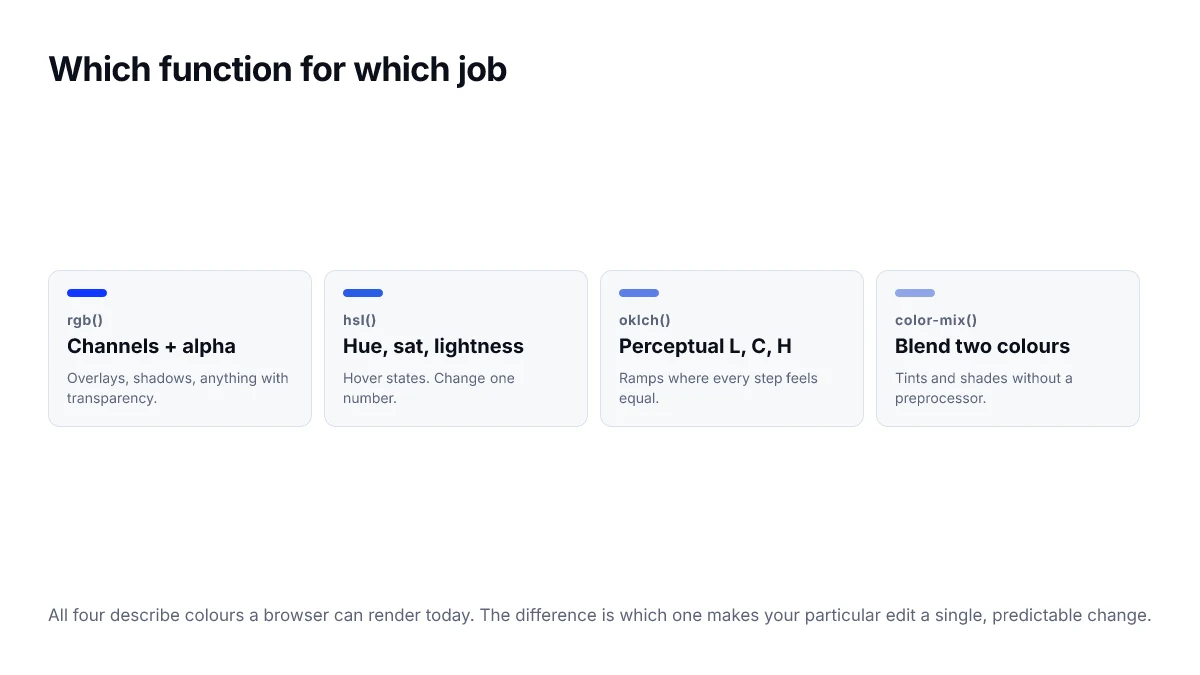
These are the perceptual spaces. lab() and lch() come from the CIE work of 1976; oklab() and oklch() are a newer refinement that behaves better through blues and purples. In practice, reach for oklch().
The reason is even spacing. Step lightness evenly in OKLCH and the ramp looks evenly spaced. Do the same in HSL and some steps jump while others barely move.
color-mix() replaces a lot of tooling
This is the one most likely to change how you write CSS. It blends two colours in a space you choose, at runtime, with no build step. Tints, shades, hover states and translucent overlays all collapse into one function.
:root { --brand: #0F37FF; }

.tint   { background: color-mix(in oklch, var(--brand) 20%, white); }
.shade  { background: color-mix(in oklch, var(--brand) 80%, black); }
.hover  { background: color-mix(in oklch, var(--brand) 90%, black); }
.subtle { background: color-mix(in srgb, var(--brand) 8%, transparent); }
The `in <space>` part matters more than it looks. Mixing in sRGB can pass through a desaturated middle; mixing in OKLCH usually does not.
A practical default
| Job | Function |
|---|---|
| Hand a colour to a person | hex |
| Overlay, shadow, scrim | rgb() with a slash |
| Hover or active state | hsl(), or color-mix() |
| A whole colour ramp | oklch() |
| Derive one colour from another | color-mix() |
| Match a printed reference | none of these — use a profile |
You do not need all eight. Most codebases do well with hex for handoff, custom properties in OKLCH for the palette, and color-mix() for everything derived from it.
color-mix() in practice
Most of what teams used a preprocessor for is a one-liner now, and it follows custom properties instead of being frozen at build time.
/* a tint and a shade of whatever --brand currently is */
--brand-tint:  color-mix(in oklch, var(--brand), white 82%);
--brand-shade: color-mix(in oklch, var(--brand), black 22%);

/* a hover state that works for any accent */
.button:hover { background: color-mix(in oklch, var(--brand), black 12%); }

/* a translucent surface, without hardcoding the base colour */
.panel { background: color-mix(in srgb, var(--brand) 8%, transparent); }
The space argument is not optional and it changes the result. Mixing in srgb passes through the desaturated middle of that space; mixing in oklch keeps chroma up. For tints and shades, oklch is almost always the better choice.
A migration order that does not break things
- Move your palette definitions into custom properties, keeping the existing hex values.
- Replace hand-maintained tints and shades with color-mix() against those properties.
- Re-author new ramps in oklch, leaving existing fixed values alone.
- Add sRGB fallback declarations wherever a modern function is the only value.
- Only then consider relative colour syntax, which has the narrowest support of the group.
Choosing a function for the job
The list of available functions is now long enough that the useful question is not what each one does but which to reach for in a given situation.
| Situation | Function | Reason |
|---|---|---|
| A fixed value from a design file | hex | Universally supported, nothing to gain elsewhere |
| Adding transparency | rgb() or hsl() with alpha | Widest support for the alpha slot |
| Tint or shade of a token | color-mix() | Follows the variable, no build step |
| An evenly stepped ramp | oklch() | Equal numeric steps look equal |
| Adjusting one channel of an unknown colour | relative syntax | Only way to isolate a channel |
| A wide-gamut brand accent | color(display-p3 …) | Reaches colours sRGB cannot describe |
Support and fallbacks in one pattern
The functions in that table have quite different support histories, and the cascade handles all of them with the same technique: declare the widely supported value first, then the enhanced one. A browser that does not understand the second line discards it and keeps the first.
.accent {
  color: #0F37FF;                              /* everywhere */
  color: oklch(0.52 0.24 264);                 /* modern browsers */
  color: color(display-p3 0.09 0.20 0.98);     /* wide-gamut screens */
}
Use @supports only when a fallback needs more than a different colour — a different layout or an extra element. For a single value, the cascade already does the work.
Frequently asked questions
- Can I still use hex codes, or is that outdated?
- Hex is not outdated and is not going anywhere. The newer functions add capabilities hex does not have, particularly calculation and wider gamut, but a fixed value you never manipulate is perfectly well expressed as hex.
- What happens in a browser that does not understand oklch()?
- The declaration is invalid and is discarded, so the property keeps whatever value it had. That is not a graceful fallback to a similar colour — it can leave text unstyled. Declare an sRGB value on the previous line so the cascade has something to fall back to.
- Is color-mix() a replacement for a preprocessor?
- For colour manipulation, largely yes. Mixing, tinting, shading and generating hover states were the main reasons to reach for Sass colour helpers, and color-mix() does all of them at runtime against custom properties, which a build step cannot.
- What does hwb() offer that hsl() does not?
- A more intuitive model for tinting and shading. Instead of a saturation and a lightness that interact, you state how much white and how much black to add to a pure hue, which maps closely to how mixing paint is described.
- Should I use the comma or space separated syntax?
- Both are valid for rgb() and hsl(), but the newer functions only accept the space-separated form. Using spaces everywhere keeps a stylesheet internally consistent and avoids the small friction of switching between conventions.
Sources
- CSS Color Module Level 4 — W3C
- color-mix() — MDN Web Docs
- oklch() — MDN Web Docs