HEX, RGB and HSL: which colour format to use and when
The three colour formats you meet daily in CSS, what each one is actually good at, and how to convert between them by hand.
Every colour on a screen is the same thing underneath: an amount of red, an amount of green and an amount of blue light. HEX, RGB and HSL are three ways of writing that down. They describe identical colours — the difference is how easy each one makes a particular job.
HEX is a compact way to write RGB
A hex code is three pairs of hexadecimal digits, one pair per channel, each running from 00 to FF — that is 0 to 255 in decimal. #0F37FF means red 15, green 55, blue 255. Nothing more clever is happening; it is RGB in base 16.
/* identical colours */
color: #0F37FF;
color: rgb(15, 55, 255);
The three-digit shorthand doubles each digit, so #0AF expands to #00AAFF. That means shorthand can only express 4,096 of the 16.7 million available colours — fine for a quick prototype, limiting for a real palette.
RGB is the same numbers, in decimal
rgb() is easier to compute with because the channels are plain numbers. It also has an alpha form for transparency, which is why you reach for it whenever a colour needs to sit over something else.
background: rgba(15, 55, 255, 0.15);

/* modern space-separated syntax, same result */
background: rgb(15 55 255 / 15%);
HSL is the one built for humans
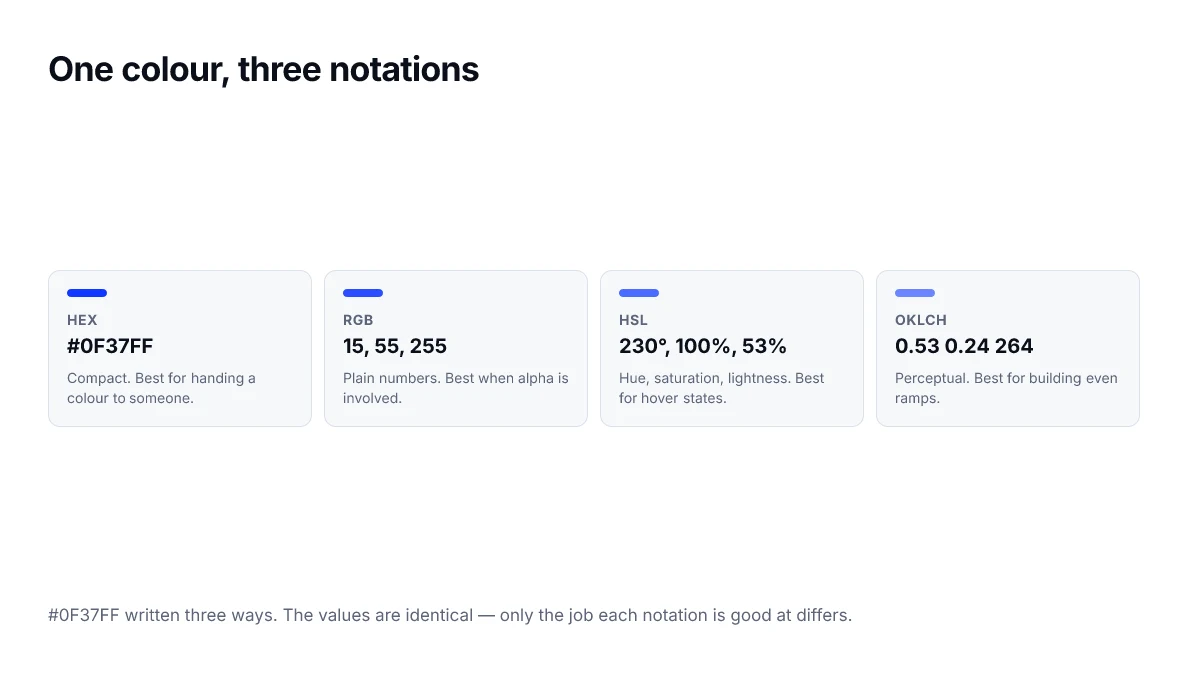
HSL restates the colour as hue, saturation and lightness. Hue is an angle on the colour wheel from 0 to 360 degrees, saturation is how vivid it is, lightness runs from black at 0% through the pure hue at 50% to white at 100%.
This is the format to use when you want to change one property and hold the others still. Making a button 10% darker on hover is one number in HSL and guesswork in HEX.
.button {
  --hue: 230;
  background: hsl(var(--hue) 100% 53%);
}

.button:hover {
  /* same hue and saturation, just darker */
  background: hsl(var(--hue) 100% 43%);
}Converting HEX to RGB by hand
Split the six digits into three pairs and read each pair as a base-16 number. The left digit is worth sixteen times the right one.
- Take #4DA374 and split it: 4D, A3, 74.
- 4D is (4 x 16) + 13 = 77, because D is 13.
- A3 is (10 x 16) + 3 = 163, because A is 10.
- 74 is (7 x 16) + 4 = 116.
- So #4DA374 is rgb(77, 163, 116).
Converting RGB to HSL
Divide each channel by 255, then find the largest and smallest of the three. Lightness is the midpoint of those two. Saturation describes how far apart they are. Hue depends on which channel came out on top.
If the largest and smallest channels are equal the colour is a pure grey: saturation is 0 and hue is undefined, conventionally written as 0.
A quick comparison
| Job | Best format | Why |
|---|---|---|
| Pasting a brand colour | HEX | Compact and universally understood |
| Overlays and shadows | RGB | Alpha channel reads clearly |
| Hover and active states | HSL | Change lightness alone |
| Generating a palette in code | HSL | Rotate the hue by a fixed angle |
| Matching a printed colour | Neither | Use CMYK or LAB |
In practice most projects use all three: HEX in the design file, HSL in the code that derives variants, and RGB wherever transparency is involved. You can move between them on any colour page here without doing the arithmetic yourself.
Which format to reach for
The formats are equivalent in what they can express, so the choice is about what you need to do with the value. A short rule: HEX for fixed values you copy from a design tool, HSL when you want to adjust a colour by hand, and a perceptual space when you are generating a scale.
| Task | Best format | Why |
|---|---|---|
| Pasting a value from a design file | HEX | Compact, and what most tools export |
| Making a hover state slightly darker | HSL | Change one number instead of three |
| Adding transparency to an existing colour | RGB or HSL with alpha | Alpha slot is part of the syntax |
| Generating an even lightness ramp | OKLCH | Steps look even, which they do not in HSL |
| Storing a theme token | Any, consistently | Readers should not have to switch formats |
The mistake people make with HSL
HSL looks like it should be perceptually sensible, because it has a lightness channel. It is not. Two colours with identical L values can look very different in brightness — hsl(60 100% 50%) is a vivid yellow that reads as light, and hsl(240 100% 50%) is a deep blue that reads as dark, despite both claiming fifty percent lightness.
This matters the moment you build a scale. Stepping L from 90 down to 10 in equal increments produces a ramp that changes quickly at one end and barely at all at the other. If you need even steps, that is precisely what OKLCH was designed for.
Converting without a tool
The conversions above are worth doing by hand once, because they make the relationship concrete. After that, use a picker — the arithmetic is mechanical, and doing it repeatedly in your head is a good way to introduce a rounding error you will not notice until a swatch looks slightly wrong.
Frequently asked questions
- Is HEX or RGB faster for the browser to parse?
- Neither, in any way you could measure. Both are converted to the same internal representation before anything is painted, and the difference is far below the noise floor of a real page. Choose the format on readability grounds, not performance.
- Why does #FF0000 look different on my phone and my laptop?
- Because the value describes a position in a colour space, not a physical amount of light. Two screens with different panels, brightness settings and colour profiles will render the same value differently. If exact matching matters, you need a colour-managed workflow and a calibrated display, not a different notation.
- Can I use HSL and HEX in the same stylesheet?
- Yes. They are interchangeable notations for the same colours, and browsers accept any mix of them. The practical advice is to be consistent within a layer — for example, custom property definitions in one format — so a reader can scan the file without switching mental models.
- What does the fourth value in rgb(0 0 0 / 50%) mean?
- It is alpha, the opacity of that colour alone. It affects only the property it is applied to, unlike the opacity property, which fades an element and everything nested inside it.
- Should I still write commas, as in rgb(255, 0, 0)?
- Both forms work and neither is deprecated. The space-separated form is the modern syntax and is what the newer colour functions use, so writing rgb(255 0 0) keeps your stylesheet internally consistent once you start using oklch() or color-mix().
Sources
- CSS Color Module Level 4 — W3C
- <color> value syntax — MDN Web Docs