LAB, LCH and OKLCH: why perceptual colour spaces matter
sRGB lies about brightness. Here is what perceptual colour spaces fix, and where they belong in everyday CSS work.
Take two colours with the same HSL lightness — say a yellow and a blue, both at 50%. Put them side by side and the yellow will look far brighter. HSL lightness is a geometric construct, not a measurement of how bright a colour appears. That gap is what perceptual colour spaces close.
What CIE LAB does
LAB describes colour with three numbers: L for lightness from 0 to 100, and a and b for position on the green-red and blue-yellow axes. It was built from experiments on human vision, so equal numeric steps correspond roughly to equal perceived steps.
The practical consequence: two colours with the same L really do look equally bright. That makes LAB the right space for measuring how different two colours are, which is how the nearest-name feature on this site works.
LCH is LAB in polar form
LCH takes the same space and swaps the a and b coordinates for chroma and hue. Chroma is how vivid the colour is, hue is the familiar angle. It is far easier to reason about than raw a and b values, because it maps onto how people already think about colour.
| Space | Lightness | Perceptually even? | Best for |
|---|---|---|---|
| HSL | Geometric midpoint | No | Quick tweaks in CSS |
| LAB | Measured L | Yes | Measuring colour difference |
| LCH | Measured L | Yes | Building palettes by hand |
| OKLCH | Measured L | Yes, improved | Modern CSS, gradients |
OKLCH, and why it is the one to use in CSS
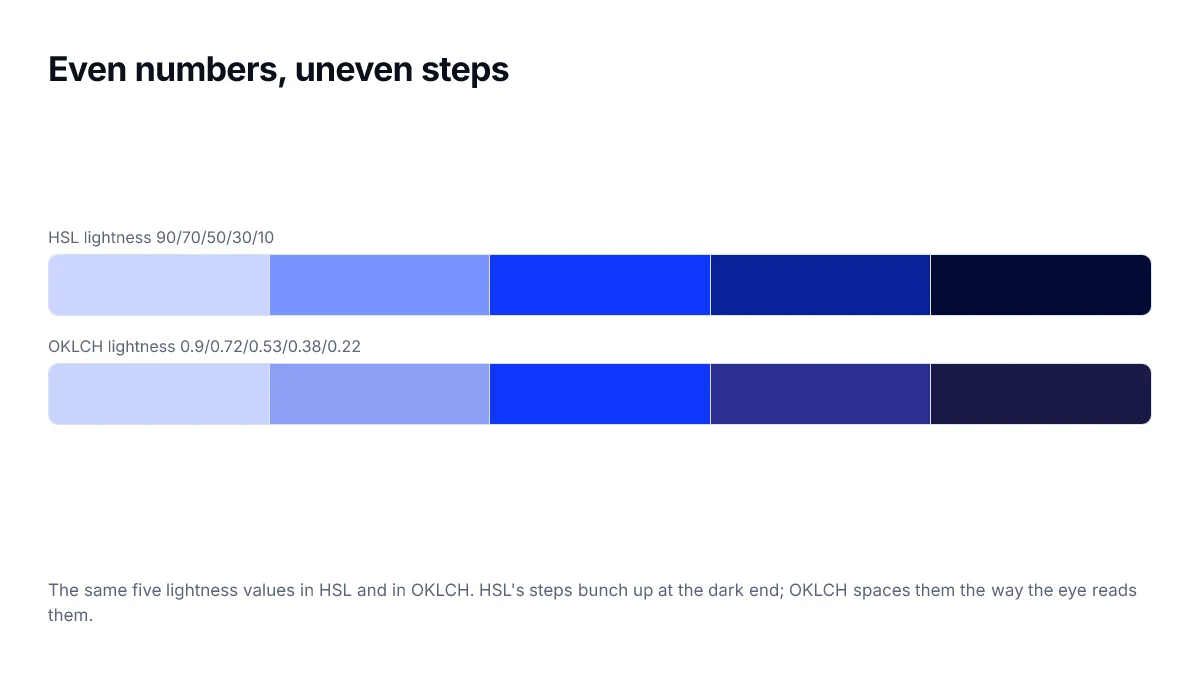
OKLCH is a newer refinement that fixes some hue-shift problems LCH has with blues and purples. It is supported in current browsers, and it is the space to reach for when you want a colour ramp where every step feels evenly spaced.
:root {
  --brand-h: 264;
  --brand-c: 0.24;

  /* only lightness changes — each step looks evenly spaced */
  --brand-100: oklch(0.95 0.04 var(--brand-h));
  --brand-500: oklch(0.53 var(--brand-c) var(--brand-h));
  --brand-900: oklch(0.28 0.16 var(--brand-h));
}
Doing this in HSL gives a ramp where some steps look like a big jump and others barely move, because HSL lightness does not track perception.
The catch: not every value is displayable
LAB, LCH and OKLCH can describe colours no screen can produce. When that happens the browser maps the colour back into range, which may not be the result you expected. Keep chroma moderate unless you are deliberately targeting wide-gamut displays.
Where each one belongs
- Use OKLCH to generate palettes and colour ramps.
- Use LAB when you need to measure how similar two colours are.
- Use HSL for quick adjustments where precision does not matter.
- Use HEX and RGB for handing values to other people and tools.
Every colour page here shows XYZ, LAB and LCH alongside the familiar formats, so you can see how a colour sits in perceptual space.
The practical test
The clearest way to see why this matters is to build the same ramp twice. Step lightness in HSL from 90 down to 10 in equal increments, then do the same in OKLCH, and put the two side by side. The HSL ramp bunches up at one end; the OKLCH ramp reads as evenly spaced, because that is what the space was constructed to do.
/* even in the maths, uneven to the eye */
--hsl-1: hsl(264 90% 90%);
--hsl-3: hsl(264 90% 50%);
--hsl-5: hsl(264 90% 10%);

/* even in the maths and even to the eye */
--ok-1: oklch(0.90 0.06 264);
--ok-3: oklch(0.55 0.20 264);
--ok-5: oklch(0.25 0.11 264);
Chroma is not saturation
One habit to unlearn: in HSL you can hold saturation at ninety percent across an entire ramp, because the number is relative. In OKLCH, chroma is absolute, and the maximum achievable chroma depends on both lightness and hue. Very light and very dark colours simply cannot carry much chroma, so a ramp that holds it constant will clip at both ends.
In practice, chroma should peak in the middle of a ramp and taper towards the extremes. That is why the example above uses 0.06, 0.20 and 0.11 rather than one value throughout.
The problem OKLCH was built to fix
CIE LAB has a known weakness in the blue region: interpolating between blue and white in LAB bends towards purple rather than travelling straight, which is visible in any gradient or ramp that crosses it. OKLAB and OKLCH were derived specifically to correct that behaviour while keeping the perceptual uniformity that made LAB useful.
For interface work this matters because blue is the most common accent colour in software. A blue ramp built in LAB drifts purple at the light end, and the drift is subtle enough to survive review and obvious enough to look like a mistake once shipped.
Reading an OKLCH value
| Channel | Range | What it means |
|---|---|---|
| L | 0 to 1 | Perceived lightness; 0.5 looks mid-grey |
| C | 0 to about 0.4 | Distance from grey; absolute, not relative |
| H | 0 to 360 | Hue angle; 264 is a typical blue |
The chroma range is the one to internalise. Unlike saturation, it has no fixed maximum — the highest achievable value depends on both lightness and hue, and asking for more than the display can produce results in gamut mapping rather than an error.
A useful rule of thumb: chroma above about 0.25 is outside sRGB for most hues, and chroma below 0.02 reads as neutral regardless of the hue angle.
Frequently asked questions
- Should I convert my whole palette to OKLCH?
- You do not need to. The value is in authoring new scales and in adjusting colours programmatically, where even steps matter. Existing fixed values in HEX are not wrong and converting them changes nothing about how they render.
- What is the difference between OKLAB and OKLCH?
- They describe the same colours. OKLAB uses cartesian axes for the two colour dimensions, and OKLCH expresses the same information as chroma and hue angle. OKLCH is easier to author with, because rotating a hue or reducing saturation is a change to one number.
- Why does increasing chroma sometimes change the hue?
- Because you have pushed the colour outside what the display can show, and the browser maps it back into the achievable range. That mapping preserves lightness and hue as far as it can, but at the extremes the result can shift visibly. Keep chroma within a range your target displays can reproduce.
- Is LAB still worth knowing about?
- Yes, for context. LAB is decades old and underpins a great deal of colour-management tooling and print workflows, so you will meet it. For new interface work OKLCH corrects several of its known weaknesses, particularly around blues.
- Do older browsers break if I use oklch()?
- They ignore the declaration as invalid, which means the element falls back to whatever it inherited — not to a similar colour. Always declare a plain sRGB value on the line before, so the cascade has something to keep.
Sources
- CSS Color Module Level 4 — lab() and lch() — W3C
- oklch() colour function — MDN Web Docs
- CIELAB colour space — International Commission on Illumination