HSL vs HSV: the difference, and which one you want
They share a hue wheel and a saturation axis, then disagree about the third one. Here is what actually separates them and when each is the right tool.
HSL and HSV get muddled constantly, partly because most colour pickers show you one while your CSS uses the other. They agree on two of three axes, which makes the disagreement easy to miss.
What they share
Hue is identical in both: an angle from 0 to 360 degrees around the colour wheel. Red sits near 0, green near 120, blue near 240. Saturation means roughly the same thing in both — how far the colour is from grey — although the two models scale it differently.
Where they diverge
| HSL | HSV | |
|---|---|---|
| Third channel | Lightness | Value (sometimes Brightness) |
| Pure hue sits at | 50% lightness | 100% value |
| 100% gives you | White, always | The hue at full strength |
| 0% gives you | Black, always | Black, always |
| White requires | L = 100 | V = 100 and S = 0 |
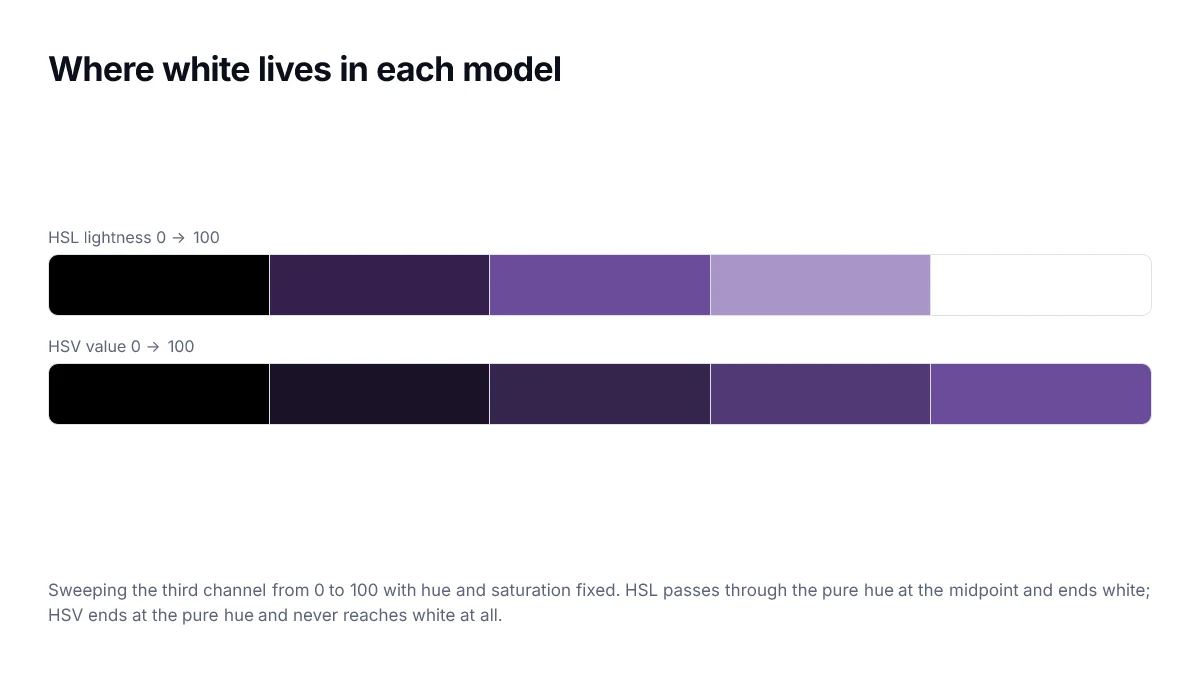
That is the whole difference. In HSL the scale runs black to hue to white, with the hue in the middle. In HSV the scale runs black to hue, and white is reached by desaturating rather than by brightening.
Why pickers prefer HSV
The familiar square-plus-hue-strip picker maps naturally onto HSV: the square is saturation on one axis and value on the other, with the strip choosing hue. The top-right corner is the pure hue, which is exactly what people reach for first. HSL would put the pure hue in the middle of the square, which feels wrong to use.
So a picker showing you HSV while you paste HSL into CSS is normal, not a bug. The picker on this site shows both, plus six other formats, for exactly this reason.
Which to use
- CSS: HSL, because hsv() is not a CSS colour function. It is not in the spec and never has been.
- Hover and active states: HSL, since dropping lightness by a fixed amount is one predictable edit.
- Picking a vivid colour by eye: HSV, which is what the picker interface is really giving you.
- Generating an evenly-spaced ramp: neither — use OKLCH, because both HSL and HSV space their steps by geometry rather than by perception.
In practice you rarely convert between them by hand. What matters is knowing that a 50% in one is not a 50% in the other, so a value copied across without converting will be wrong.
Converting between them
The hue is identical in both, so only saturation and lightness or value need converting. Going from HSV to HSL, the lightness is the value scaled by how much saturation has been removed, and the saturation is rescaled to fit the new lightness.
// h is unchanged; s and v are 0-1
function hsvToHsl(h, s, v) {
  const l = v * (1 - s / 2);
  const sl = l === 0 || l === 1 ? 0 : (v - l) / Math.min(l, 1 - l);
  return [h, sl, l];
}
Note the guard on lightness of exactly 0 or 1. At pure black and pure white, saturation is undefined — there is no hue left to be saturated — and dividing without the guard produces NaN.
A practical takeaway
You will meet HSV when picking a colour and HSL when writing one down. That division of labour is the whole story: HSV is the better interface for exploration because its square wastes no space, and HSL is the better notation for a stylesheet because lightness maps onto how designers talk about tints and shades.
Why the same numbers give different colours
The clearest way to internalise the difference is to take one set of numbers and read it as both. Hue 210, saturation 100 percent, third value 100 percent means a vivid blue in HSV — full value, full saturation, the purest form of the hue. The same numbers in HSL mean pure white, because lightness of 100 percent is white regardless of what the other channels say.
| Third channel at 100% | HSL gives | HSV gives |
|---|---|---|
| With full saturation | White | The pure hue |
| With zero saturation | White | White |
| At 50% | The pure hue | A darker version of the hue |
| At 0% | Black | Black |
So the axes agree at black and disagree at the top. That single asymmetry accounts for every practical difference between the two models, including why a picker built on HSV can use a full square while an HSL equivalent wastes its top edge on shades of white.
Which one your tools are using
If a picker shows a square with a hue strip beside it, it is HSV internally, whatever it displays. If it shows two separate sliders labelled saturation and lightness, it is HSL. Knowing which is which explains why dragging to the top-right corner gives you a vivid colour in one tool and white in another.
Frequently asked questions
- Is HSV the same as HSB?
- Yes. HSB stands for hue, saturation, brightness and is the name Adobe tools use for what everyone else calls HSV. The two are identical in every respect; only the label differs.
- Can I use HSV directly in CSS?
- No. CSS supports hsl() but has no hsv() function. If a picker gives you HSV values you need to convert them, which is why most web pickers display HSL or hex alongside the HSV square they use internally.
- Why does 100% saturation mean different things in each?
- In HSV, full saturation with full value gives you the most vivid version of the hue. In HSL, full saturation with 50% lightness gives you that same vivid colour, while full saturation at 100% lightness gives you white. The lightness axis in HSL runs all the way to white, and the value axis in HSV stops at the pure hue.
- Which should I use to build a tint and shade scale?
- Neither, ideally. Both produce scales that look uneven because their lightness axes are not perceptual. If the scale needs even visual steps, build it in OKLCH and convert.
- Why do design tools show a square and a hue strip?
- That layout is an HSV picker. The vertical hue strip selects H, and the square maps saturation horizontally against value vertically. It works well because every point in the square is a valid distinct colour, which is not true of an equivalent HSL square.
Sources
- CSS Color Module Level 4 — hsl() — W3C
- hsl() colour function — MDN Web Docs